Integrating CLM with Salesforce: Patterns, Pitfalls and a Practical Checklist
Key takeaways
- Sales should launch contracts from the opportunity, never by email.
- Agree a system of record for every field before you build.
- Event-driven updates beat nightly batches for contract status.
- Plan for errors, retries and monitoring from day one.
For most companies, the sales contract starts life in the CRM. The opportunity has the customer, the products, the price and the owner. Re-typing all of that into a separate contract system wastes time and introduces errors.
That is why the CRM-to-CLM integration is usually the first, and most valuable, integration in any contract management rollout.
The core pattern
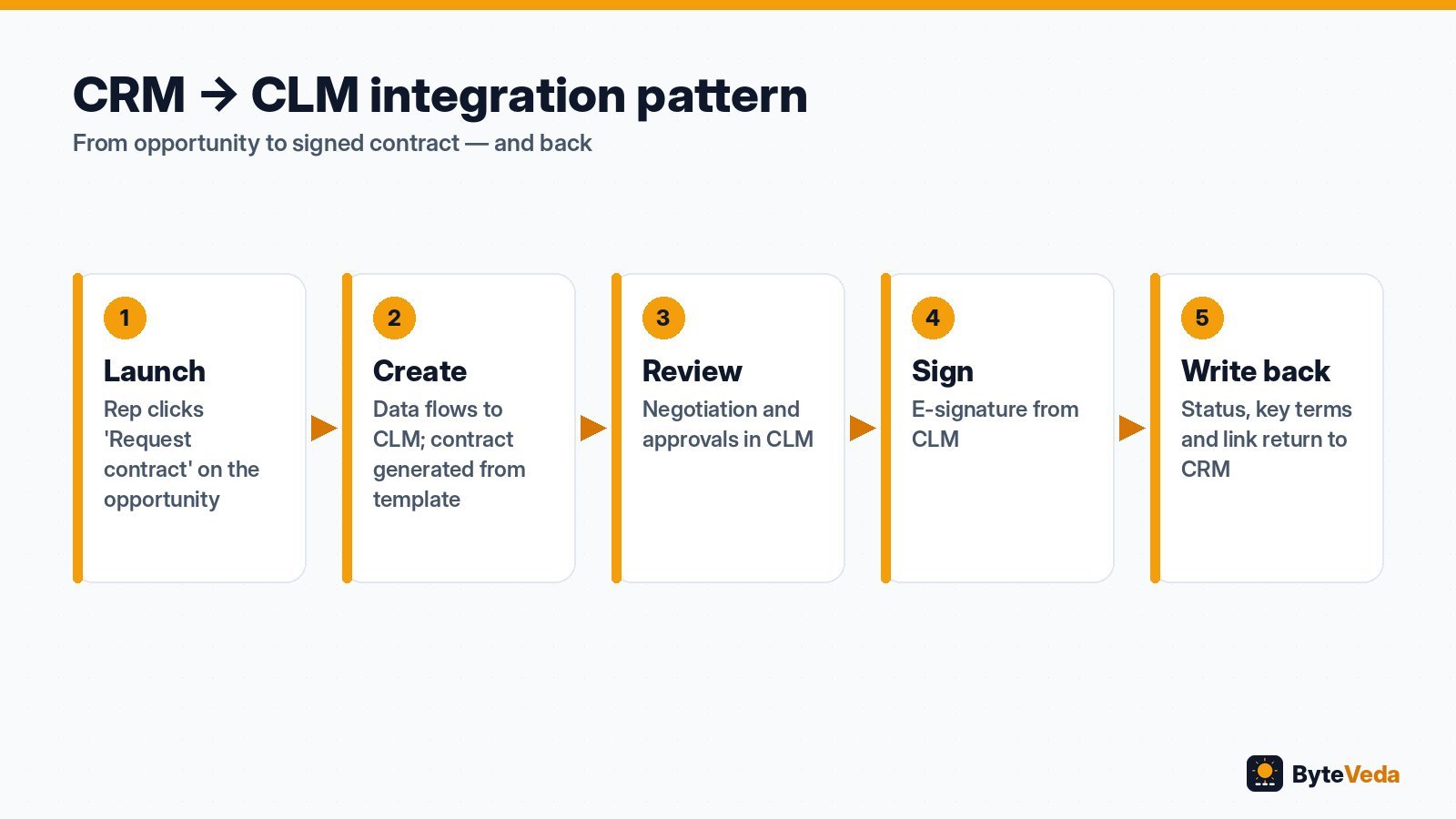
- Launch: the sales rep clicks a button on the opportunity to request a contract.
- Create: opportunity and account data are sent to the CLM, which generates the contract from the right template.
- Sync status: as the contract moves through review, approval and signature, its status flows back to Salesforce.
- Write back: once signed, key terms — effective date, value, term, renewal date — and a link to the executed document are written back to the opportunity or a contract object.
Choosing your integration approach
| Approach | Strengths | Watch out for |
|---|---|---|
| Vendor’s native connector | Fast to deploy, supported by the vendor | Limited customisation |
| Middleware / iPaaS (e.g. Workato, MuleSoft, Boomi) | Flexible mapping, error handling, monitoring | Licensing cost, needs integration skills |
| Custom code | Full control | Maintenance burden over time |
Many organisations start with the native connector and move to middleware once requirements outgrow it — for example, when they need to sync custom objects, line items or multiple CLM instances.
Pitfalls to avoid
- No system of record. If both systems can edit the same field, they will drift apart. Decide which system owns each field.
- Batch-only syncs. A rep should not wait until tomorrow to see that a contract was signed. Use events or webhooks where the platform supports them.
- Ignoring picklist mismatches. “Master Services Agreement” in one system and “MSA” in the other will break mappings. Build a translation table.
- Forgetting about amendments. Renewals and amendments relate to existing contracts. Design how they link back.
- Silent failures. An integration that fails without anyone noticing is worse than no integration. Alert on errors and review them daily at first.
Pro tip
Test with your messiest real records — long account names, special characters, multi-currency deals, missing fields. Clean demo data hides real-world failures.
A practical checklist
- Contract types in scope, and which Salesforce objects trigger them
- Field mapping for each direction, with the system of record named
- Picklist and value translation tables
- Trigger mechanism: button, status change, webhook or schedule
- Handling for amendments, renewals and cancellations
- Document link or file write-back approach
- Error handling, retries and alert recipients
- User and permission model in both systems
- Test scenarios, including negative and edge cases
- Monitoring and ownership after go-live
Integrations are not “set and forget”. Treat them as products with owners, monitoring and a change process.
Get this one integration right and the rest of the CLM programme gets easier — sales adoption follows, and legal gets a clean, complete pipeline of contract data.